ImagesLesson
How to turn a sketch into clean line art
Upload a pen sketch, trace it into clean line art in the editor, then find the gaps a crayon would leak through and close them before you print.
In short
In the editor, open Library, then Elements, Generate and Trace my sketch, pick your uploaded sketch and click Trace my sketch. Click Place to put the line art on the page, then use Fill preview and Line weight to find and close its gaps before you print.
A scanned sketch is a picture made of pixels. At print size its lines can come out soft or jagged, and you can't make them bolder. In a coloring book, small breaks in an outline cause a second problem: a reader's crayon runs straight through them into the next area. Tracing turns the drawing into line art you can resize and adjust, and Fill preview shows every leak before you order a proof copy.
Trace my sketch comes with the Creator, Publisher and Studio plans and spends AI credits. Founders' Lifetime does not include it. On the Free plan, the Generate tab says these tools are on paid plans. Line weight and Fill preview cost nothing and work on every plan, on any traced line art already on your page.
Trace your sketch#
Upload your sketch
Open your book. In the tool rail on the left, click Library, then the Uploads tab. Click Drop images here, or click to browse. and choose your sketch, or drag the file onto it. It takes a PNG or JPEG up to 10 MB. The sketch appears in your uploads.
Trace it
In the same panel, click Elements, then Generate, then Trace my sketch. Under What's in the sketch?, write a few words about the drawing. Under Pick a sketch to trace, click your sketch, then click the Trace my sketch button. The chip beside it shows the cost, and the line art is usually ready in a few seconds.
Place it on the page
Click Place under the result. The line art lands in the middle of the page, selected, so you can drag it into position and resize it from its corners like any element. It is made of smooth shapes, not pixels, so it stays sharp at any size.
Find the open areas
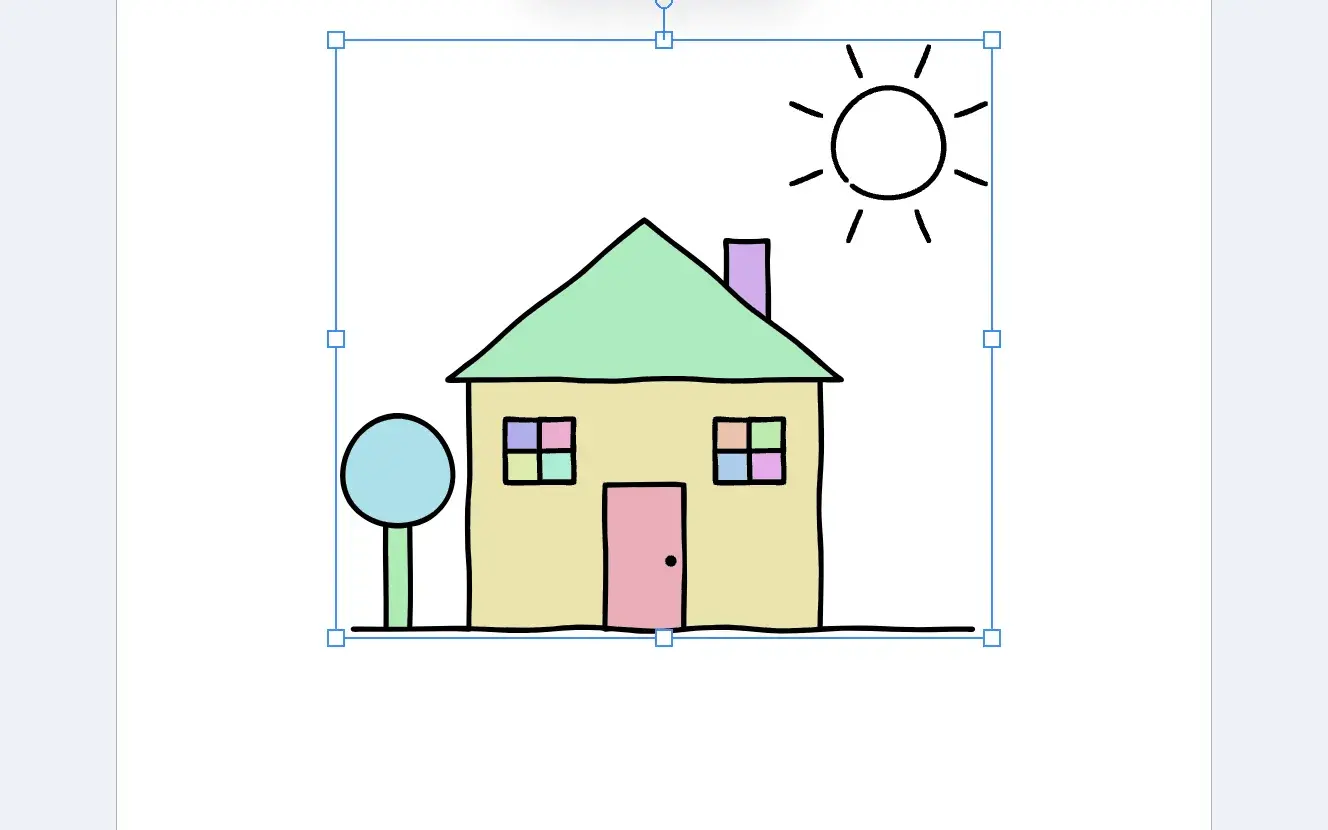
With the line art selected, click Fill preview in the toolbar above the page. Every area a reader can color fills with a pale color. An area that stays white is open: a gap in its outline lets color spill into the area around it. Hover over Fill preview to see how many areas there are to color.
The colors only mark the areas. They change each time the preview redraws.
Close the gaps with Line weight
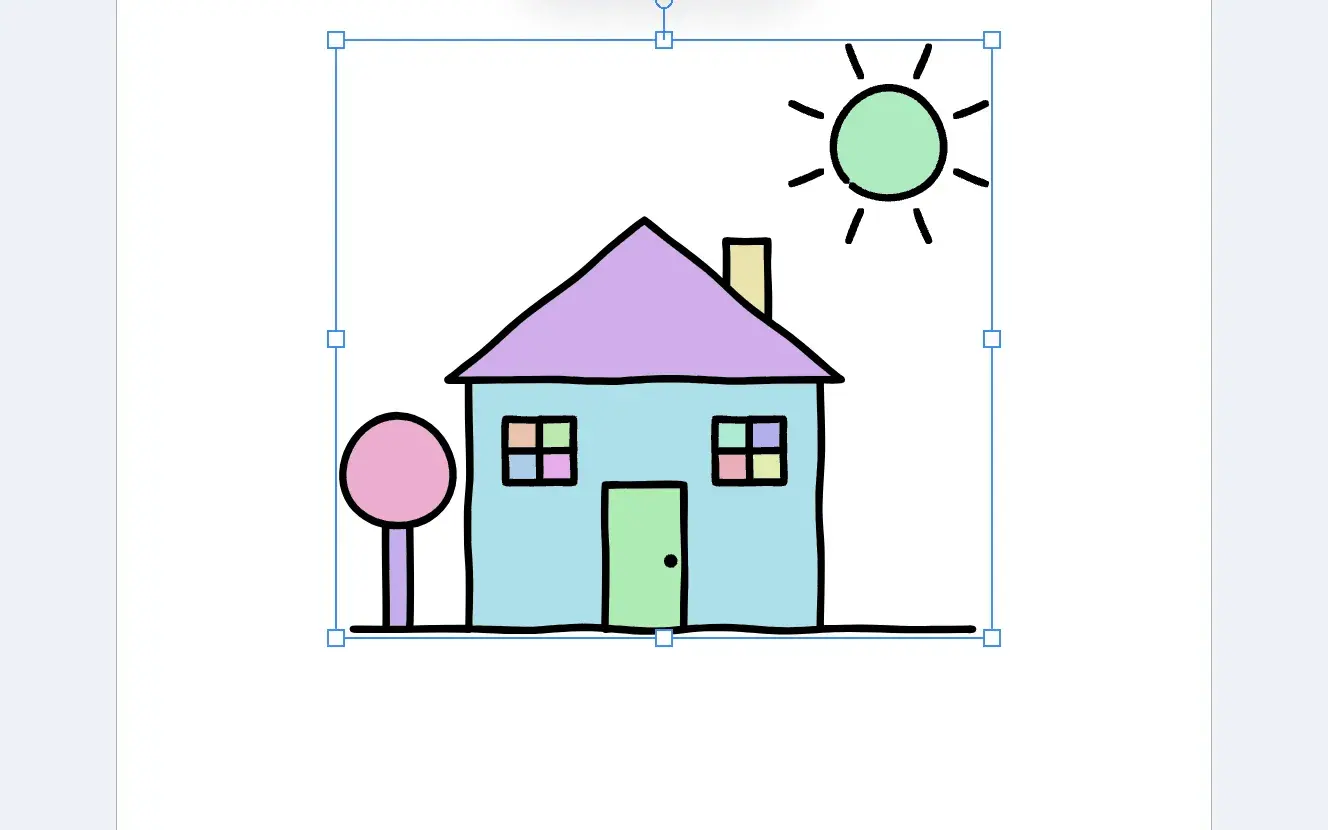
Click Line weight in the same toolbar and drag the slider to the right. It starts at Original and adds up to 3 pt to every line. As the lines grow, small gaps close, and Fill preview colors in the areas they used to leave open. Stop at the lowest weight that closes the gap.
The gap, before and after#
Drag the divider to compare. At the traced weight, the sun stays white because its outline has a small break; with bolder lines, the break closes and the sun colors in.
Go back to the original lines#
Drag Line weight back to Original, or press ⌘Z. To turn Fill preview off, click it again or select anything else; it is never part of your pages or your exported file. Your sketch stays in Uploads, so you can trace it again after you redraw it.
For what KDP checks in the finished interior file, read What KDP Checks in an Interior PDF.
Common questions
Does tracing the same sketch again give a different result?
No. A sketch traces the same way every time, so running it again gives the same line art and spends another credit. To change the result, change the drawing and upload it again.
What kind of sketch traces best?
Clean black lines on white paper. Ink over a pencil sketch, or scan it in black and white. Shading and gray tones come out less cleanly than a single dark line.
Will Line weight change my uploaded sketch?
No. It changes only the line art on the page and how thick its lines print. Your sketch stays as it was in Uploads, and Original puts the lines back to their traced weight.
Does Fill preview show up in my book?
No. The colors appear only in the editor while the line art is selected. They never reach the page thumbnails or the file you export.
What does it cost?
Tracing a sketch costs 1 credit, shown on the chip beside Trace my sketch before you click. It comes with the Creator, Publisher and Studio plans. Line weight and Fill preview cost nothing and work on every plan.
Try it on your own book
Open a book in SmartKDP and follow the steps above. It takes about 6 minutes.