KDP Cover Templates: Blank Guides vs Designs
By SmartKDP
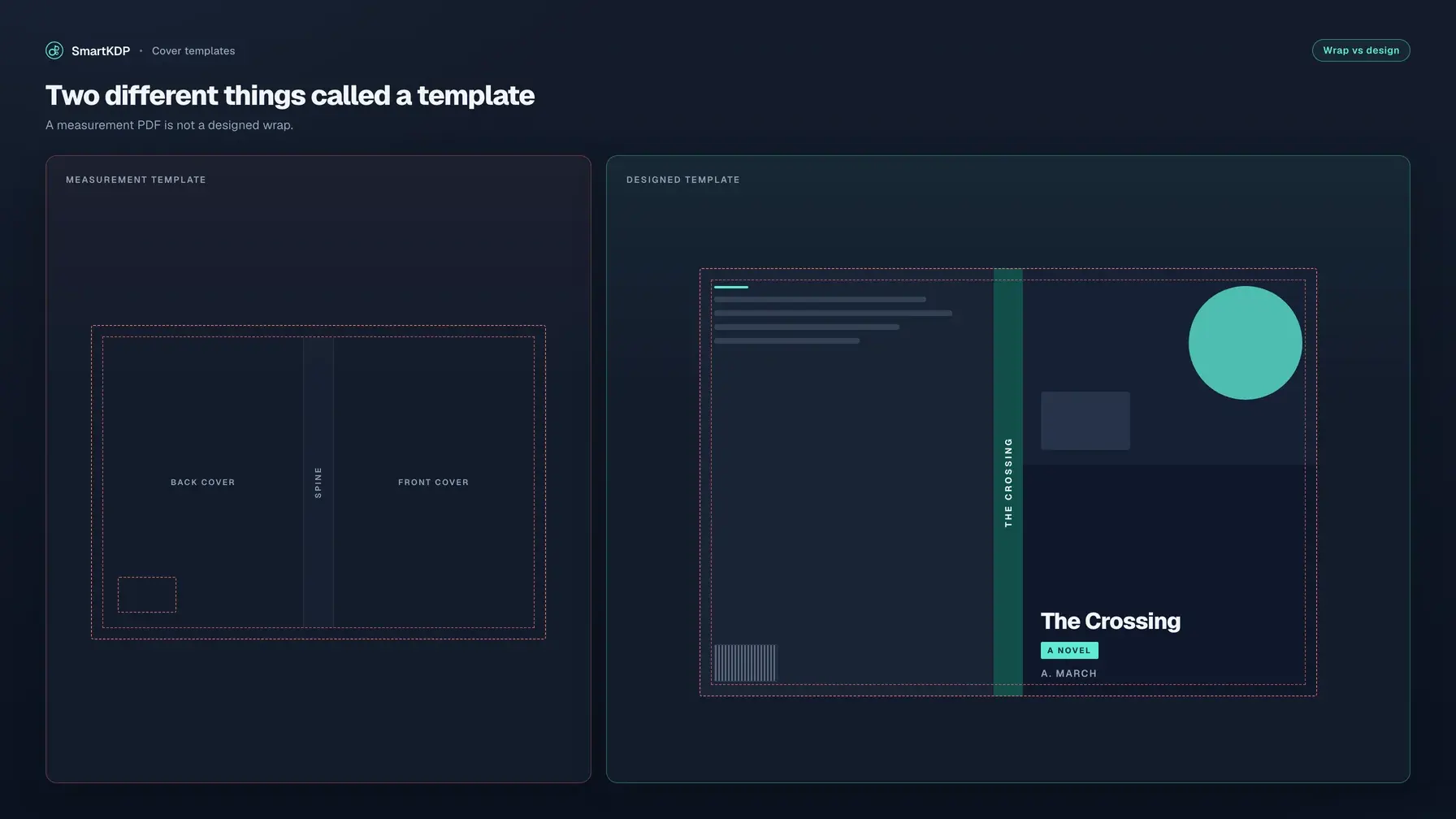
Search “KDP cover templates” and you get two different files mixed together: a blank measurement wrap with trim, spine, and bleed lines drawn on a PNG or PDF, and a designed starting layout for a genre. Using the wrong one is how you lock a pretty front to the wrong spine width, or sit down to design and still have a blank canvas.
This guide names both, shows how to generate the blank wrap for your trim and page count, and gives four tests for a designed template. If you only need the measurement file, open the free KDP Cover Template Generator.
Not affiliated with Amazon. Amazon, Kindle, KDP, and related marks are trademarks of Amazon.com, Inc. or its affiliates. SmartKDP is not affiliated with, endorsed by, or sponsored by Amazon. Measurement rules paraphrase public KDP help. Confirm final dimensions against KDP’s cover calculator and template generator and current help before you upload.
The two things “cover template” means
| What people say | What the file actually is | What it is for |
|---|---|---|
| Blank measurement template | One full-wrap PNG or PDF with trim, spine, bleed, safe area, and barcode guides | Size the canvas. It is not a design. |
| Designed cover template | A starting layout for a genre — title, back panel, artwork — that you customize | Start the art. Useless if it cannot rebuild to your trim and spine. |
Amazon’s Cover Creator (inside a KDP account) is a third path: in-tool layouts, not a file you download. This post is about the two files the query actually returns.
The product Amazon prints is still one PDF: back, spine, and front as a single image (Create a Paperback Cover). A front-only JPEG at trim size is a thumbnail, not a cover template.
Get the blank measurement template
The blank file exists because spine width is not a guess:
spine width = page count × per-page thickness
cover width  = (2 × trim width) + spine width + (2 × bleed)
cover height = trim height + (2 × bleed)
Cover bleed is 0.125 in (3.2 mm) on the outer edges. Thickness depends on ink and paper; live constants belong in the cover size calculator and KDP’s help page. Cream is thicker than white. Drop ten interior pages and the wrap width moves.
Generate this while you still control page count and trim. A template built on draft Word “pages” will not match the PDF KDP manufactures. Spine equations in full: How to Calculate KDP Cover Size.
What the lines are
KDP’s official template and the SmartKDP generator draw the same job: full cover (the canvas, including bleed), front and back trim boxes, the spine panel (KDP only prints spine text on books with more than 79 pages), a safe area inset so type does not walk onto a fold, and the barcode keep-out — 2 in × 1.2 in on the back, with a 0.25 in margin. None of those lines belong in the upload. Printing them prints them.
Numbered walkthrough
- Finish the interior PDF. Use the printed page count KDP will manufacture — every leaf, including blanks. Not Word’s estimate.
- Open the KDP Cover Template Generator.
- Choose paperback or hardcover. Paperback uses KDP’s published thickness table. Hardcover is a different construction — treat those numbers as planning sizes and verify against KDP’s official hardcover template before you submit.
- Set trim size to the interior trim.
- Enter that page count. Choose interior color and paper.
- Read full wrap with bleed and spine width — the document size in your design app.
- Download the PDF (vector guides) or the transparent PNG (300 DPI, no background — a layer above the art).
- Optional: the book-title field names the PDF’s file properties. It is never printed on the template.
KDP’s cover calculator generates the same kind of PNG/PDF. Use one built on the current page count. After any interior change that adds or drops pages, or a switch of cream/white or ink, generate again.
Four tests for a designed template
A designed template is a starting layout, not a JPEG you stretch. These four tests outlive any catalog.
| Test | Pass | Fail |
|---|---|---|
| Resolves to your trim and spine | Wrap width is computed from your trim, page count, paper, and ink | A fixed preview size, a “6×9 / 120 pages” PSD, or a JPEG you squash onto a different spine |
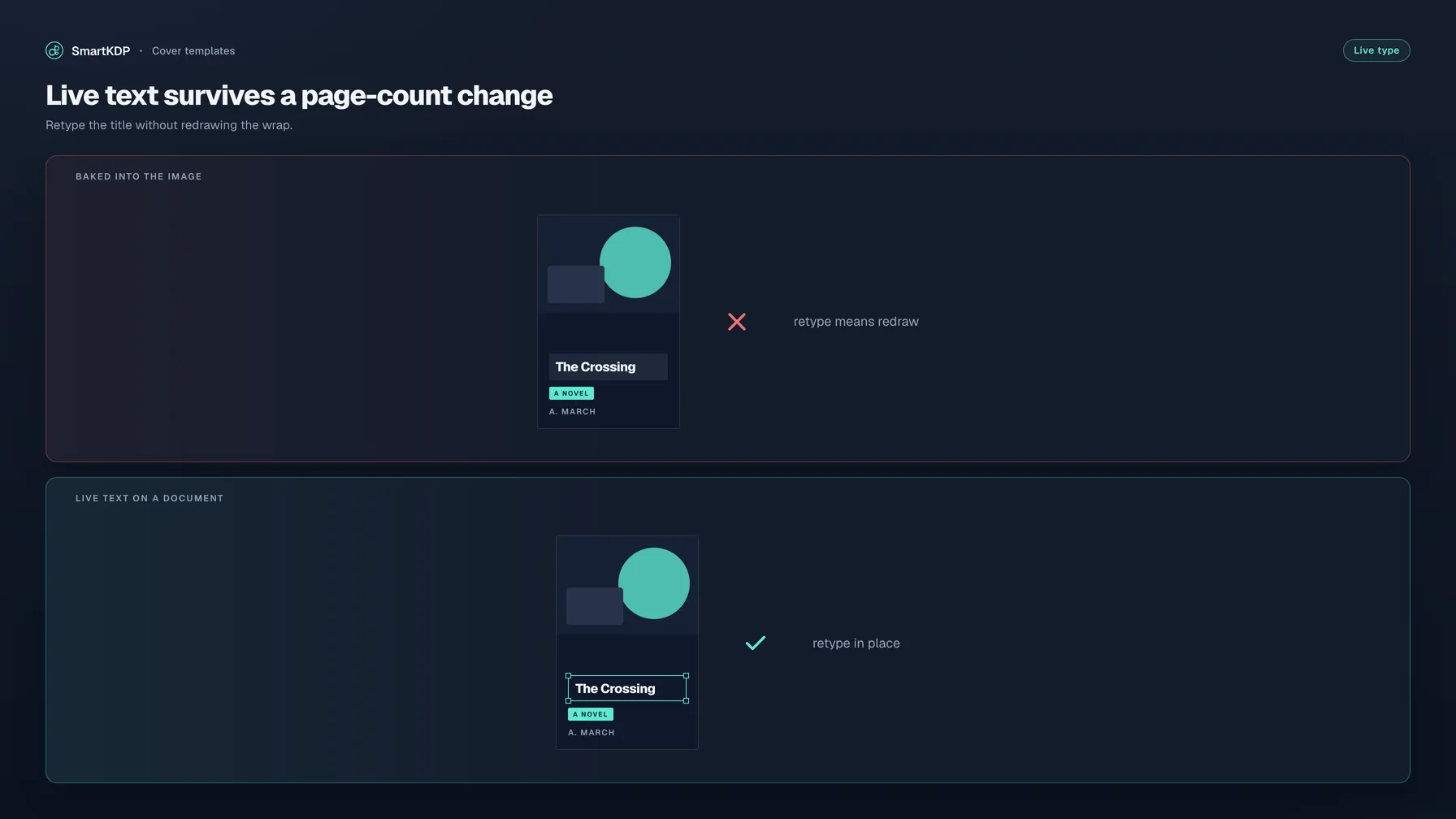
| Title is live text | You can click the title, subtitle, and author and retype them | The title is pixels inside the artwork |
| Barcode keep-out is clear | Back panel leaves the 2 in × 1.2 in box plus 0.25 in margin empty | Blurb, badges, or a pattern run into the rectangle KDP will stamp |
| Fonts licensed for commercial print embedding | Every face may be embedded in a PDF you sell | A “personal use” display face, a system font that refuses embedding, or type flattened so you cannot tell |
A marketplace “premade cover” with the title painted into a JPEG fails tests one and two on purpose. Change page count and you resample the lettering. A template that lands as editable objects on a wrap sized to this book survives both.
SmartKDP’s Cover Designer catalog is built that way: applying a template can be undone in one step, every element is a normal object, and the wrap is your book’s real trim and spine — not a preview rectangle.
Why the wrap has to be your trim
Spine width is page count × per-page thickness. Change cream to white, cut two filler pages, or switch to premium color, and the wrap width moves. A template authored at one preview size has to re-layout, not stretch. When the interior gains a chapter, live title text and separate motifs move on a new wrap; a baked JPEG with the title trapped inside it has to be resampled.
If the cover is linked to an interior in Cover Designer, two kinds of drift raise a banner — and nothing is recomputed automatically, because you may have proofed this exact file:
- The book grew (or shrank). The cover’s saved page count no longer matches the interior.
- KDP’s figures changed. A KDP measurement our calculations rely on was updated.
The banner offers the update. You take it. A template that cannot resolve to the new wrap is scrap, which is why test one is not optional.
Hardcover is not a taller paperback. Boards overhang the page block, a hinge sits between spine and face, and KDP does not publish the same paperback thickness table for case laminate. Plan on a generator, then replace the planning file with KDP’s hardcover template before the upload that costs a reprint.
What a cookbook cover has to do that a thriller does not
Genre is a print job. A template that “looks nice” and misses the job still fails at phone-thumbnail size.
A cookbook has to name the food job (weeknight, baking, a diet, a cuisine) before it names a mood. A recipe-count or format cue often does more work than a dark photograph. Back-cover chips (time, method, diet) still have to miss the barcode box. A near-black wrap with one crimson slash will read as a crime novel.
A thriller is the opposite job: title and author are the product. High contrast, one accent shape, type that still reads small. The back can go dark — and the barcode keep-out still has to be actually empty, not “dark enough that a barcode will be fine.”
The other six in a closed list are the same idea, different job: romance needs series branding and live title text you will reuse; fantasy and sci-fi need a world cue and a series line that survives a long title; self-help and business need outcome-forward hierarchy, not decoration that eats the title; children’s need type off the trim corners the guillotine eats; journal and planner treat the format word as the product; low-content activity needs huge readable format words (word search, mazes, sudoku) because clutter turns to mud at thumbnail size.
You are choosing a layout that already knows where the title, the series line, and the barcode live for that shelf.
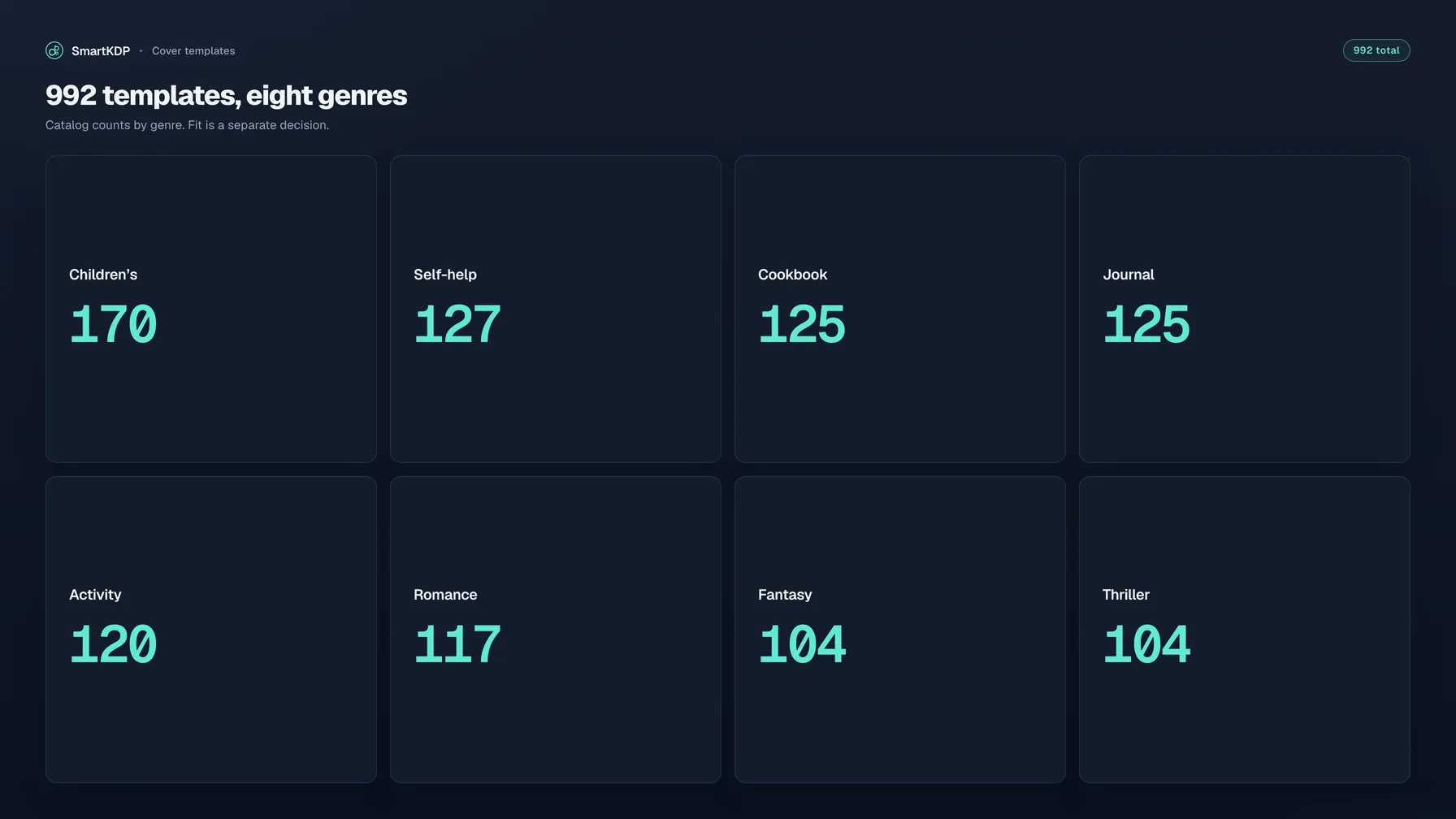
992 designed templates, eight genres
Counted from the live catalog:
| Genre | Templates |
|---|---|
| Children’s | 170 |
| Self-help & business | 127 |
| Cookbook | 125 |
| Journal & planner | 125 |
| Low-content activity | 120 |
| Romance | 117 |
| Fantasy & sci-fi | 104 |
| Thriller & mystery | 104 |
| Total | 992 |
The genre vocabulary is closed at those eight. Free and pro tiers both exist; pro is gated at apply time. Browse them in the in-editor gallery (Cover Designer) on one wrap-sized page — back, spine, and front as a single document — with live guides for bleed, trim, spine folds, panel safe area, and the barcode keep-out.
Two constructions: shape-built covers (editable shapes and live text in the design’s own colors) and image covers (a few separate pieces of artwork plus live text you can move or recolor). Never one flattened picture with the title trapped inside it.
Licensing: what you are allowed to print and sell
A template does not clear rights. Three gates sit between “I like this layout” and a book you can sell.
1. The blank file is a guide. Hide or delete the layer before export. Crop marks, template text, and color bars are on KDP’s pre-publication “remove these” list.
2. Fonts must be licensed for commercial print embedding. KDP’s cover help tells you to embed fonts. A web-licensed face is not automatically embeddable in a print PDF you sell. SmartKDP’s preflight treats font licensing (embedding) as a real export gate. Flattened lettering fails tests two and four together: you cannot even audit the license.
3. You need the rights to every image and motif on the wrap. A “premade cover” JPEG is only as printable as that seller’s license. Cover Creator inside KDP is Amazon’s in-account layouts — a different path.
KDP also requires cover text to match the title, author, and edition in title setup. Passing a generator or a preflight check does not bind Amazon. Print Previewer still has the last word.
How to use the free KDP Cover Template Generator
- Freeze the interior: final PDF page count, trim, ink/paper, paperback vs hardcover. Two bindings are two wraps.
- Generate the blank measurement template from those specs (walkthrough above, or KDP’s own calculator).
- Place the PNG/PDF as a locked guide layer in your design app, or start a cover in Cover Designer so the wrap is already that size with live guides.
- If you start from a designed template, apply one that passes the four tests — especially “resolves to your trim” and “title is live text.”
- Keep title and critical art inside the safe area. Extend backgrounds into the 0.125 in bleed. Leave the barcode keep-out clear unless you place your own barcode to KDP’s spec.
- Hide the guide layer. Export a single-page print PDF: fonts embedded, images at ≥300 DPI at placed size, no crop marks. Details in KDP Cover File Requirements.
- Run Print Previewer. If the interior then changes, generate a new blank wrap (or take the drift update) before you spend another night on the art.
Interior, then wrap, then art: How to Design a KDP Book Cover Yourself. Skipping that order is how a “template” becomes a reprint.
FAQ
What is a KDP cover template?
Two files share the name. A blank measurement template is a PNG or PDF of the full wrap with trim and barcode guides. A designed cover template is a starting layout for a genre that you customize. Cover Creator inside a KDP account is Amazon’s in-tool version of the second, not a download.
Where do I download a free KDP cover template?
For the blank wrap, use the free generator at the top of this guide or KDP’s official cover calculator. Enter trim, page count, ink, and paper; hide the guides before export. For a designed layout, pick a catalog that rebuilds to your trim — Cover Designer has free and pro templates — not a fixed-size JPEG.
What size is a 6×9 KDP cover template?
There is no single 6×9 cover file. Width is two trim widths plus spine plus 0.125 in bleed on each outer edge; spine is page count times paper thickness. Generate from the printed page count. Do not reuse another title’s 6×9 template.
Can I use a KDP cover template in Canva?
Yes, if the app can open a PNG or PDF and export a single-page PDF at the exact wrap size. Place the transparent PNG on its own layer, design underneath, hide the layer before export. Resizing will not fix a wrap built on the wrong page count.
Are premade KDP covers the same as cover templates?
No. A premade cover is usually a JPEG with the title already painted in. A template is a layout you retarget: live type, movable objects, a wrap that matches this book’s spine. If you cannot click the title and retype it, you bought art, not a template.
Do I leave the template lines on the cover I upload?
No. KDP’s pre-publication checklist says to remove crop marks, color bars, and template text. Hide the layer; submit artwork only.
Can I sell a book that uses a cover template?
Yes, if you have the rights to every font and image, the fonts embed in the print PDF, cover text matches title setup, and the file is a correctly sized full-wrap PDF. The blank template is a ruler; a designed template is a starting layout you take responsibility for. Confirm in Print Previewer.
Related free tools
- KDP Cover Template Generator — blank wrap PDF/PNG with trim, spine, bleed, and barcode guides
- KDP Cover Size Calculator — spine width and full-wrap dimensions when you only need the numbers
- Word Count to Page Count Calculator — a planning page count before the interior PDF exists
- All free tools
Disclaimer
Amazon, Kindle, and Kindle Direct Publishing (KDP) are trademarks of Amazon.com, Inc. or its affiliates. SmartKDP is an independent site and is not affiliated with, endorsed by, or sponsored by Amazon. Always confirm cover dimensions, page limits, barcode rules, and file requirements in your KDP account and current Amazon help documentation before you publish.