How to Calculate KDP Cover Size and Spine Width
By SmartKDP
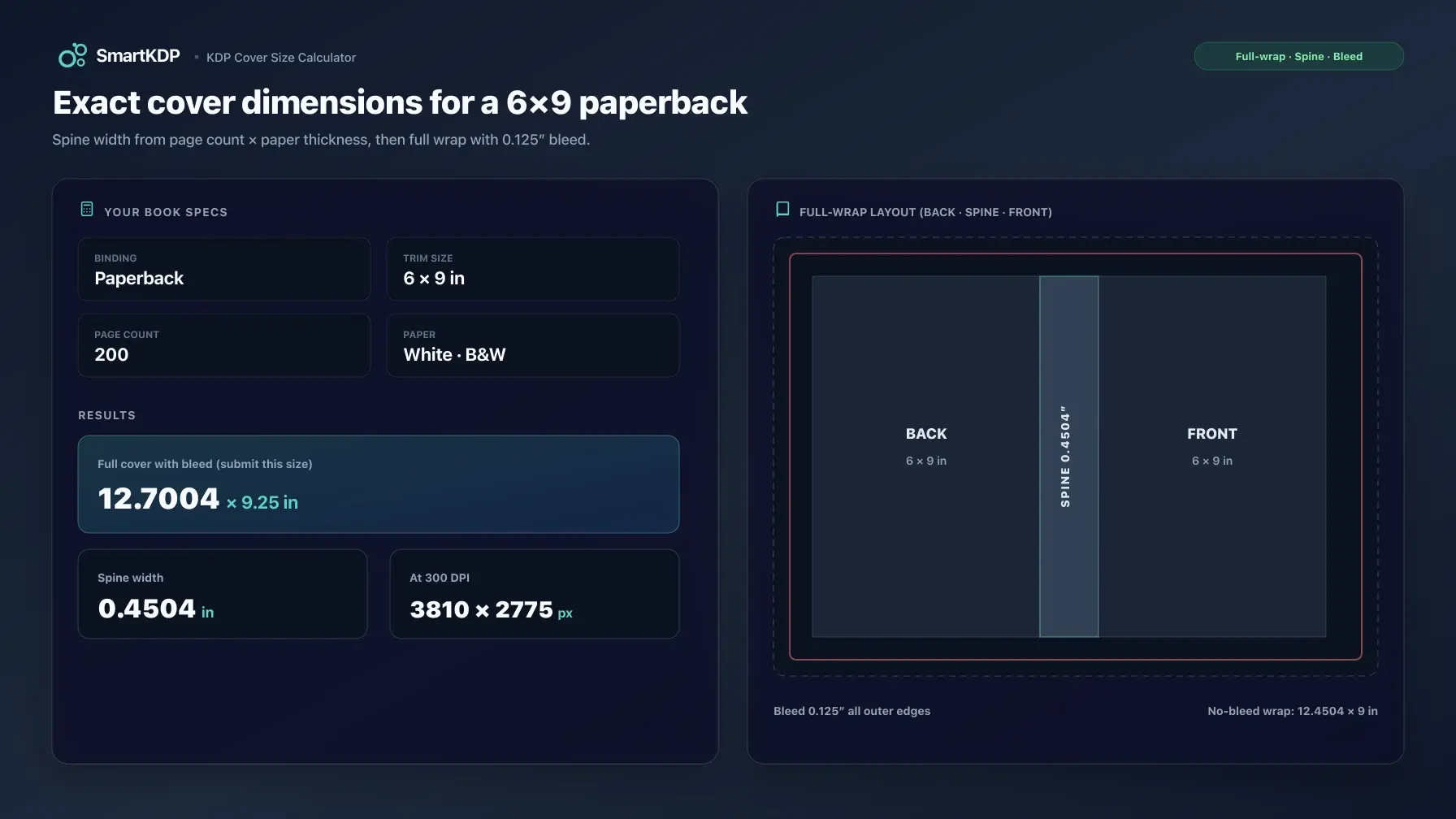
Your Amazon KDP cover is not “front cover art at the trim size.” It is one full-wrap PDF: back cover, spine, and front cover as a single image, sized so the printer can trim, fold, and bind it without cropping your title or leaving a white edge.
Get the spine wrong by a few hundredths of an inch and you do not get a gentle preview warning — you get a rejection, a redesign, or a printed book where spine text sits on the hinge. This guide walks the formulas KDP publishes for paperback covers, the constraints that bite before you open Canva or Photoshop, and where hardcover is different. When you want exact inches, centimeters, points, and 300 DPI pixels for your trim, page count, ink, and paper, use the free KDP Cover Size Calculator.
Not affiliated with Amazon. Figures below describe public KDP help-page rules and formulas. KDP revises manufacturing guidance periodically — confirm final cover dimensions against KDP’s own cover calculator and template generator and current help docs before you upload.
The constraint that bites first
Do not design the cover until page count, trim size, binding, ink, and paper are final.
Spine width is a function of how many pages you print and how thick each page is. Change cream to white, drop two filler pages, or switch from black-and-white to premium color, and the spine moves. The full wrap width moves with it. A cover file built on draft Word page count will not match the PDF KDP actually prints.
That is the same ordering problem as pricing: printing cost depends on final page count. Cover geometry does too. Lock the interior, then size the wrap.
The durable paperback formulas
KDP’s Create a Paperback Cover help page publishes the layout equations and the per-page thickness table. The durable core is:
spine width = page count × per-page thickness

cover width  = bleed + back trim width + spine width + front trim width + bleed
cover height = bleed + trim height + bleed
For a standard left-to-right paperback, back and front trim widths equal your interior trim width, so the width equation is the same as:
cover width  = (2 × trim width) + spine width + (2 × bleed)
cover height = trim height + (2 × bleed)
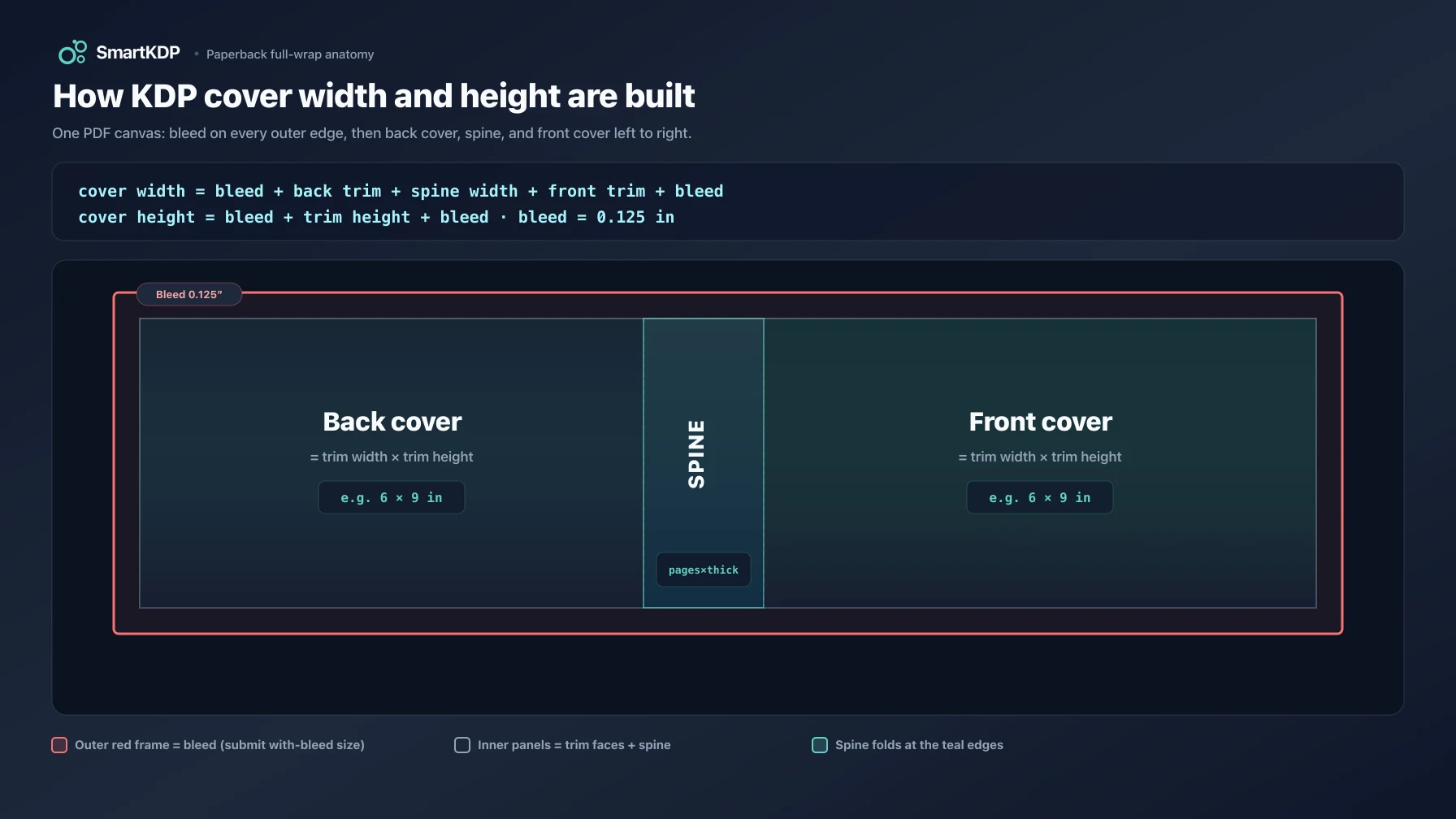
Bleed is not optional on covers. KDP requires 0.125 in (3.2 mm) of bleed on the outer edges of the cover so background color and full-bleed art still reach the edge after trim. Our calculator always reports both:
- Full cover without bleed — the trim-based wrap (two faces + spine)
- Full cover with bleed — the file size you actually submit
Submit the with-bleed size as the PDF canvas. KDP trims the bleed off after printing.
There is no extra “cover allowance” on paperback spine in KDP’s published paperback formula. Spine is page count times thickness — full stop. If a third-party article adds a fixed fraction of an inch to paperback spine “for cover material,” that is not KDP’s paperback equation. (Hardcover construction does add board and wrap structure; that is a different layout.)
Per-page thickness (from KDP)
Thickness depends on interior ink/paper, not on trim size. From KDP’s paperback cover help (verified against that page for this post):
| Interior / paper | Per-page thickness |
|---|---|
| Black & white on white paper | 0.002252 in (0.0572 mm) |
| Black & white on cream paper | 0.0025 in (0.0635 mm) |
| Standard color paper | 0.002252 in (0.0572 mm) |
| Premium color paper | 0.002347 in (0.0596 mm) |
Same page count, cream vs white: cream is thicker, so the spine is wider. Design once for white and then switch paper without rebuilding the wrap, and you can leave a gap or squeeze text into the hinge.
If KDP revises a thickness constant later, the shape of the math above still holds. The current values, with the date we last checked them, are in the KDP Cover Size Calculator.
What “page count” means
Use the printed PDF page count KDP will manufacture — every leaf in the interior file, including blanks, front matter, and back matter.
Do not use:
- Word’s “pages” estimate under a different trim or font
- Manuscript word count divided by some rule of thumb
- Odd/even “leaves” instead of PDF pages
KDP community guidance and the formula itself assume the manufacturing page count. When you re-export the interior and the PDF gains or loses pages, re-run spine width before you rebuild the cover.
Also respect page-count bounds for ink type. Black-and-white and premium color floors/ceilings differ from standard color’s published range; large trims can be tighter still. The calculator flags interior-level bounds; unusual trim/paper combinations still need a final check against KDP’s Set Trim Size, Bleed, and Margins tables and the official template generator.
Worked example (paperback, illustrative)
Take a 6 × 9 in paperback, black & white on white paper, 200 pages.
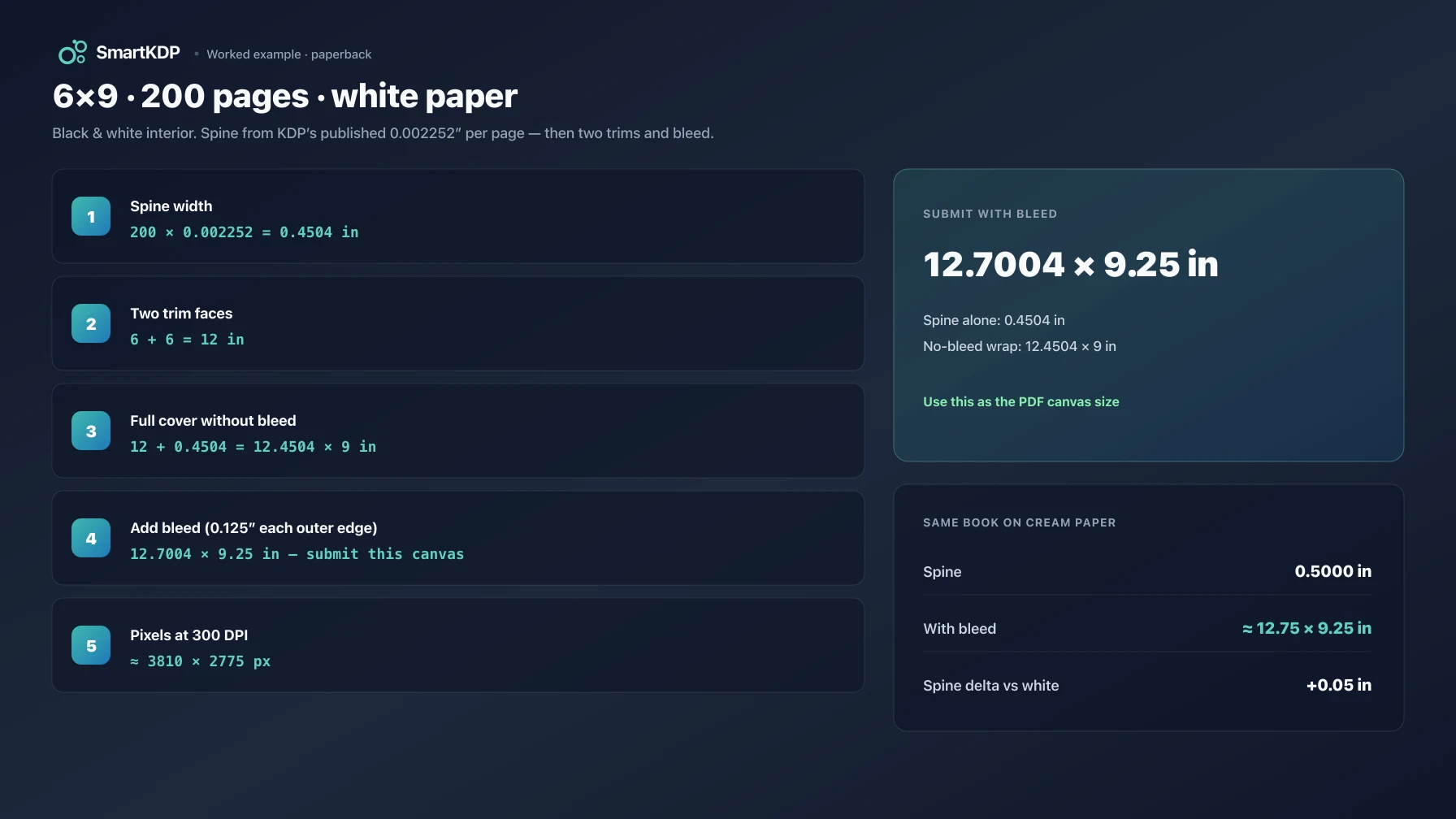
- Spine width = 200 × 0.002252 = 0.4504 in (tools often round display values; keep full precision in layout software until export).
- Trim faces = 6 in + 6 in = 12 in
- Full cover without bleed = 12 + 0.4504 = 12.4504 in wide × 9 in tall
- Add bleed = 2 × 0.125 in on width and height → 12.7004 in × 9.25 in
- Pixels at 300 DPI ≈ width × 300 by height × 300 (for a raster workflow). Vector/PDF layouts work in inches or points (72 pt = 1 in).
Same book on cream:
spine = 200 × 0.0025 = 0.5 in
full cover with bleed ≈ 12.75 in × 9.25 in
That is a 0.05 in wider spine than white — small on a ruler, large when spine type was already tight.
Plug your real trim and count into the KDP Cover Size Calculator for inches, cm, pt, and px together, plus a downloadable SVG guide layer.
Spine text: the 79-page rule is not a design guideline
KDP’s paperback cover help is explicit:
- They only print spine text on books with more than 79 pages.
- Title setup language also frames a minimum of 79 pages to include spine text; Cover Creator uses an 80-page minimum. If you are near the edge, treat 80+ as the safe practical floor and leave spine text off thin books entirely.
- Spine text needs at least 0.0625 in (1.6 mm) of clear space on each side of the type so it does not wrap onto the front or back when the fold shifts.
Passing the page-count rule does not mean the type will look good. After both side clearances, an 80-page black-and-white white-paper spine has very little usable height for title + author. Many publishers treat roughly 150 pages as a practical floor for spine text they actually want someone to read — that is design judgment, not a KDP law. Below that, plan a full-bleed spine graphic or no type.
Also allow production variance around the fold. KDP warns that hard edges right on the spine fold make small shifts obvious. Soft transitions across the spine are safer than a hard color break exactly on the fold line.
Bleed, safe area, and barcode
Three zones people confuse:
| Zone | What it is | What you do |
|---|---|---|
| Bleed | 0.125 in past the outer trim | Extend backgrounds/images into it |
| Safe area | Inset from the trim (front/back) | Keep title, subtitle, and critical art inside |
| Barcode area | Reserved rectangle on the back | Leave clear if KDP places the barcode; size correctly if you place your own |
Backgrounds and full-bleed images must reach into the bleed. Front and back text should stay at least 0.125 in inside the trim lines and must not invade the spine. Borders near the trim are risky because of trim variance; KDP discourages thin borders for that reason.
If you do not place your own barcode, leave the lower back-cover barcode region free of important art — KDP can place one for you. If you place your own, match KDP’s barcode size and resolution requirements from the same help topic (and the hardcover barcode rules differ slightly on placement insets).
Paperback vs hardcover
Paperback cover math is fully specified on KDP’s paperback help page: thickness table + bleed + two trim faces + spine.
Hardcover is a different construction:
- The wrap includes case wrap that folds around the boards (KDP’s hardcover help describes wrap past the front cover edge; their imperial and metric figures are not perfectly consistent with each other — use KDP’s template for the final file).
- There is a hinge zone between spine and front/back safe area. Do not put critical type or the barcode in the hinge.
- Front “visible” board is not exactly the interior trim; boards overhang the book block.
- Spine thickness is not published as the same simple paperback table. KDP points hardcover authors at the official cover calculator and template generator.
Our free calculator gives a planning estimate for hardcover spine and wrap. That estimate is useful for planning art and comparing trims; it is not a substitute for KDP’s official hardcover template before final submission. The tool’s FAQ states the accuracy caveat on purpose — prefer that honesty over a false sense of precision.
Hardcover also does not use every paperback ink option (for example, standard color is a paperback-oriented path in our option set). Check format availability for your market when you set print options.
Resolution and file requirements (quick)
- Cover is a single PDF: back + spine + front as one image.
- 300 DPI minimum for raster images placed in the layout.
- Prefer CMYK intent for print; avoid spot colors and locked/encrypted PDFs.
- Flatten transparencies; embed fonts; strip crop marks and template junk.
- Stay under KDP’s cover file size limits (KDP recommends keeping files lean; very large PDFs fail or slow conversion — see their size guidance on the same help pages).
None of those replace correct geometry. A beautiful 300 DPI cover at the wrong canvas width is still wrong.
How to use the free KDP Cover Size Calculator
- Open the KDP Cover Size Calculator.
- Choose paperback or hardcover.
- Set trim size to match the interior project (not a “close enough” size).
- Enter the final PDF page count.
- Choose interior color and paper (white/cream only apply where black-and-white allows them; color interiors force color stock).
- Read spine width, full cover with and without bleed, and unit conversions.
- Download the SVG cover guide if you want fold lines and safe zones as a layer in your design tool.
- After any interior change that alters page count or paper, re-run before export.
If you are also pricing the book, pair this with the KDP Royalty Calculator — page count drives both spine width and printing cost.
Common failure modes
- Designed the front only. KDP needs the full wrap as one PDF.
- Used draft page count. Re-export interior → re-measure spine.
- Switched cream/white or ink after cover lock. Rebuild the wrap.
- Spine text under ~80 pages. Remove it; KDP will reject or fail print rules.
- Important art in bleed-only zone or barcode box. It gets trimmed or covered.
- Hard edge exactly on the spine fold. Print variance makes it look crooked.
- Hardcover art built on paperback dimensions. Boards, wrap, and hinge change everything.
- Copied a competitor formula that adds a paperback “cover allowance.” Use KDP’s paperback equation or their template.
FAQ
How do I calculate KDP cover size?
Compute spine width from page count × per-page thickness for your paper/ink, then add two trim widths and 0.125 in bleed on each outer edge for total cover width and height. Or enter the same inputs in the free KDP Cover Size Calculator / KDP’s official template generator.
What is the KDP spine width formula for paperback?
spine width = page count × per-page thickness, using KDP’s published thickness for white, cream, standard color, or premium color paper. There is no extra fixed paperback “cover stock” term in that help-page formula.
What bleed does KDP require on covers?
0.125 in (3.2 mm) on the outer edges of the full wrap so backgrounds and images still reach the edge after trim. Covers are built with bleed; do not submit a trim-only canvas as the final file size.
How many pages do I need for spine text?
KDP only prints spine text on books with more than 79 pages (and requires clearance on each side of the type). Thin journals and short low-content books should leave the spine blank or use non-text design.
Does cream paper change cover size?
Yes. Cream is thicker per page than white, so the spine — and therefore the full wrap width — is larger at the same page count. Recalculate when you change paper.
Are hardcover cover sizes the same as paperback?
No. Hardcover adds wrap around the case boards, hinge zones, and board overhang. Spine thickness is not the same published paperback table. Plan with a calculator, then verify with KDP’s hardcover template before upload.
What resolution should my cover be?
300 DPI for raster artwork at the final physical size. Convert inches to pixels by multiplying by 300 when you work in Photoshop-style tools; PDF/vector workflows can stay in inches or points.
Why does my cover keep getting rejected?
Common geometric causes: wrong page count in the spine math, missing bleed, spine text on a book under the page threshold, barcode collision, or a canvas that does not match KDP’s expected full-wrap size. Fix dimensions first, then hunt compression or font issues.
Related free tools
- KDP Cover Size Calculator — full-wrap dimensions, spine width, bleed, SVG guide
- KDP Royalty Calculator — printing cost and royalty once page count is real
- Book Pricing Calculator — list price vs margin tradeoffs
- All free tools
Disclaimer
Amazon, Kindle, and Kindle Direct Publishing (KDP) are trademarks of Amazon.com, Inc. or its affiliates. SmartKDP is an independent site and is not affiliated with, endorsed by, or sponsored by Amazon. Always confirm cover dimensions, page limits, and file requirements in your KDP account and current Amazon help documentation before you publish.