KDP 50% vs 60% Royalty: When to Raise Price
By SmartKDP
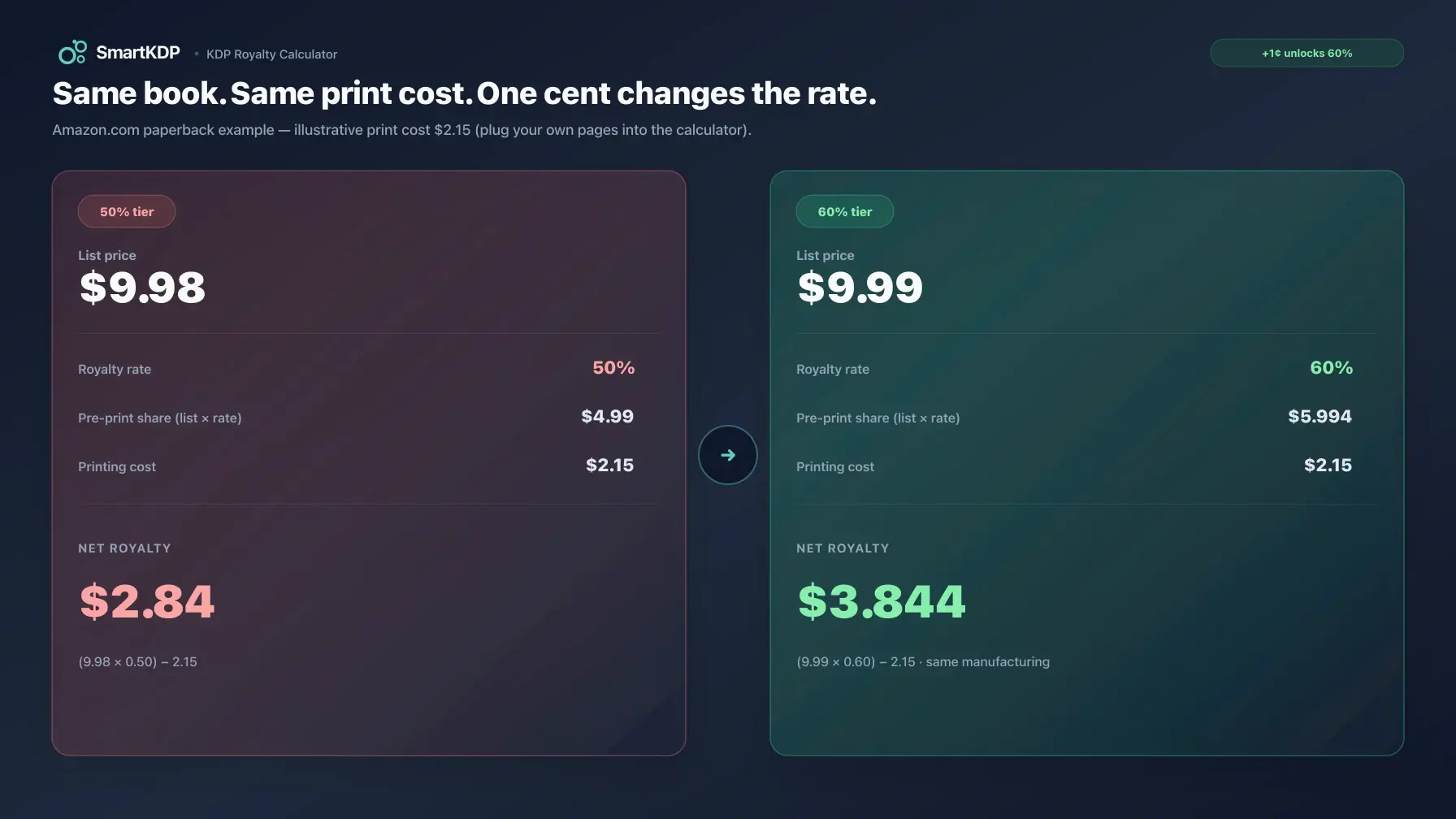
Crossing a one-cent list-price threshold can change your Amazon KDP print royalty rate from 50% to 60%. Missing it does not cost you “about 10%” of what you keep — after printing cost, the hit to net royalty is often far larger.
This post is a pricing decision guide: when the 50% / 60% split applies, what each marketplace’s threshold is (from KDP’s own help pages), how to compare two list prices fairly, and when staying under the threshold can still make sense. For live printing cost and royalty on your page count, ink, and trim, use the free KDP Royalty Calculator. For the full manufacturing formula and ebook 35% vs 70% rules, see How KDP Printing Costs and Royalties Work.
Not affiliated with Amazon. Figures below describe public KDP help-page rules. KDP revises thresholds and cost tables periodically — confirm high-stakes pricing in your KDP account and current help docs before you publish.
The only formula that matters for the tier decision
For paperback and hardcover sold on Amazon, KDP uses:
royalty = (list price × royalty rate) − printing cost
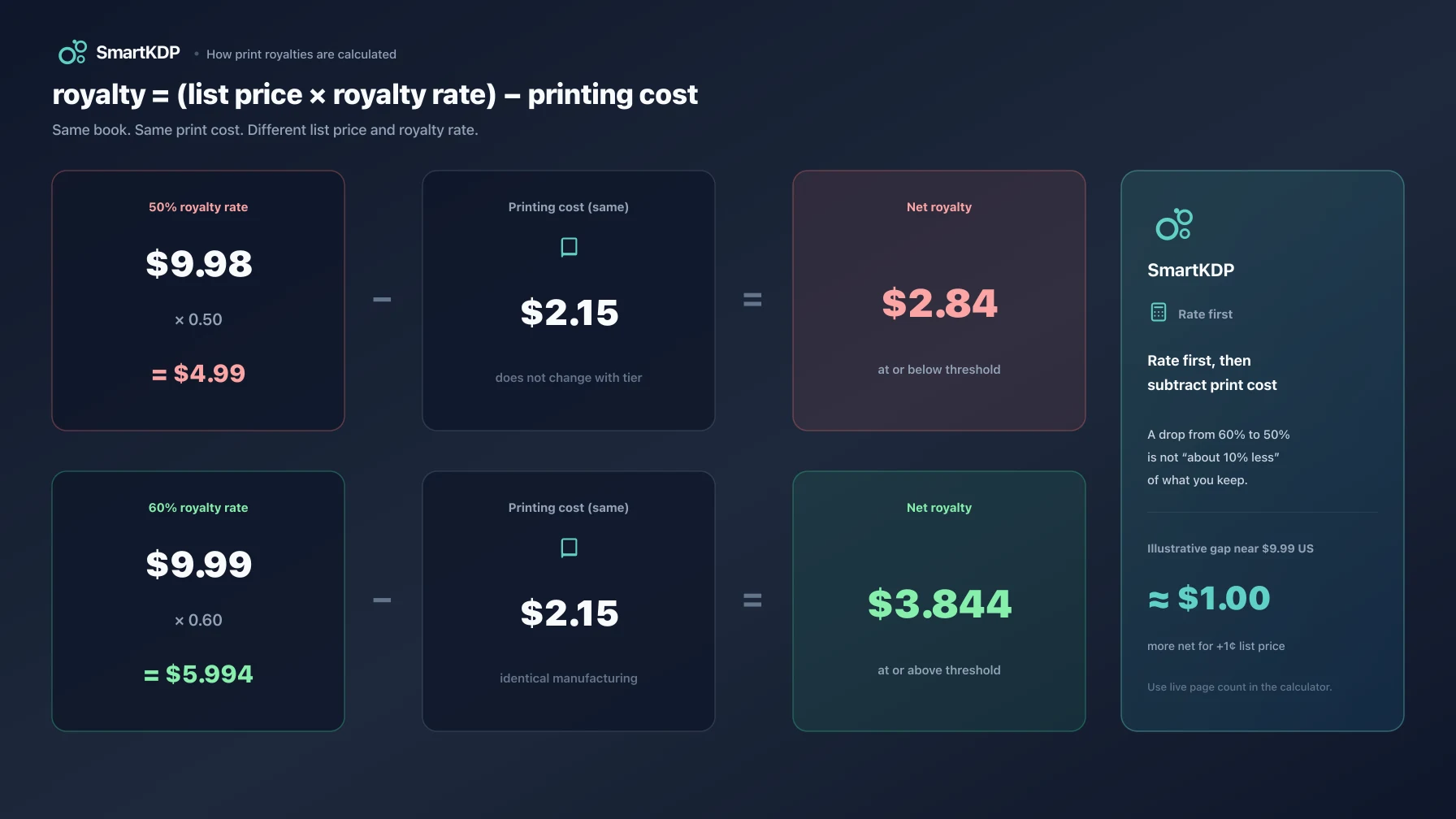
- Royalty rate is 50% when list price is at or below the marketplace’s low threshold.
- Royalty rate is 60% when list price is at or above the marketplace’s high threshold.
- Printing cost does not change when you move price across the threshold. Same interior, same market, same cost — only the rate flips.
That order of operations is load-bearing. KDP multiplies list price by the rate first, then subtracts manufacturing. A lower rate shrinks the share of list you start with; printing cost is still taken in full dollars. So a drop from 60% to 50% is not “ten percentage points off your payout” in any simple way.
Expanded Distribution is a separate channel with a flat 40% rate (paperback only; not hardcover). It does not use the 50/60 Amazon-tier table. Model it as its own line item, not as a third Amazon tier.
Marketplace thresholds (from KDP help)
KDP publishes the split per marketplace on the Paperback Royalty and Hardcover Royalty help pages. Paperback thresholds as of that documentation:
| Marketplace | 50% at or below | 60% at or above |
|---|---|---|
| Amazon.com | 9.98 USD | 9.99 USD |
| Amazon.co.uk | 7.98 GBP | 7.99 GBP |
| Amazon.de / .fr / .it / .es / .nl / .ie / .com.be | 9.98 EUR | 9.99 EUR |
| Amazon.ca | 13.98 CAD | 13.99 CAD |
| Amazon.com.au | 13.98 AUD | 13.99 AUD |
| Amazon.co.jp | 999 JPY | 1000 JPY |
| Amazon.pl | 39 PLN | 40 PLN |
| Amazon.se (paperback) | 109 SEK | 110 SEK |
Hardcover uses the same pattern in markets where hardcover is offered. One published difference worth knowing: hardcover on Amazon.se uses a lower SEK band than paperback (98 / 99 SEK on KDP’s hardcover table, not 109 / 110). Always read the rate line for the format you are pricing — do not assume paperback thresholds apply to every format in every store.
If a threshold changes later, the decision process in this post still holds; only the boundary numbers move. Our KDP Royalty Calculator applies the dated tier table in our cost data when you enter a list price.
Why “only 10% less” is the wrong mental model
Authors often hear “50% instead of 60%” and picture a modest haircut. Work the share before printing cost:
| List price (US example) | Rate | Share of list before print |
|---|---|---|
| 9.98 USD | 50% | 4.99 USD |
| 9.99 USD | 60% | 5.994 USD |
The step from just under the threshold to just over it increases that pre-print share by about one dollar on Amazon.com — for a one-cent list-price move. Printing cost is identical on both sides of the line, so nearly all of that dollar flows into royalty.
Now hold list price fixed in your head and vary manufacturing cost. The dollar gap between the two rates is roughly stable near the threshold; the percentage of your royalty that gap represents gets worse as printing cost rises, because net royalty is already thinner.
Illustrative shape (same US list prices; print cost is a variable you plug in — not a claim about current rate tables):
royalty_50  = (9.98 × 0.50) − print_cost
royalty_60  = (9.99 × 0.60) − print_cost
gap         ≈ royalty_60 − royalty_50   (about $1 near this boundary)
- Thin black-and-white journal, low print cost → ~$1 is a large but not catastrophic share of a healthy per-sale royalty.
- Long color interior, high print cost → ~$1 can be a huge share of a thin residual, or the difference between positive royalty and a price that barely clears minimum list.
That is why re-checking list price against the tier after you lock page count and ink is not optional nicety. Set price after you know manufacturing cost, not before the interior is final.
When raising list price is worth it
Use this as a decision checklist, not a slogan.
1. You are already near the threshold
If your planned price is $8.99–$9.98 (US) “because that feels right for a short book,” run the calculator at that price and again at $9.99. For many thin paperbacks the extra dollar of royalty per unit is larger than any realistic volume loss from a one-dollar list increase — but volume is your judgment; the calculator only gives per-sale truth.
2. Printing cost is high relative to list
Color interiors, large page counts, and large-trim surcharges raise the floor. When minimum list price is already near or above the 60% band, sitting in the 50% band is often impossible or pointless: KDP will not let royalty go negative, and a high floor may push you into 60% automatically. Confirm with min-price output in the calculator, not with a rule of thumb.
3. You sell in multiple marketplaces
Thresholds are per currency and store. A book that sits comfortably above $9.99 on Amazon.com can still land in the 50% band on another store if you leave foreign list prices on autopilot or set them too low. Price each marketplace deliberately, then scan the all-markets table.
4. You need margin for ads or series lead-ins
Per-sale royalty funds advertising and loss-leader strategy. If you plan paid ads against a thin 50% residual, the math can fail even when the book “sells.” Raising into 60% can be the difference between a testable ad unit and one you cannot afford to promote.
When staying at 50% can still be rational
The 60% band is not mandatory morality. Cases where a lower list price can win:
- Genre price ceiling. Some categories train readers on a tight band. If $9.99 is outside what buyers will try for your format and length, volume may dominate per-unit royalty. You still need the per-unit number so you know how many extra sales you need to break even on the raise.
- Promo or series entry. A deliberately low entry price can make sense as a funnel if later books or the ebook carry margin. Model each SKU; do not average them in your head.
- You are already far below the threshold for a strategic reason. Jumping from a deep promo price to the 60% floor is a product decision, not a royalty-table decision — just know what each step costs in rate.
Never assume “lower price always sells more enough to compensate.” That is an unmeasured hope. Measure the per-sale gap first; then decide if your conversion story covers it.
Worked comparison (illustrative)
KDP’s own paperback help page walks a 333-page black-ink US example at $15 list with a $5.00 printing cost and shows:
(0.60 × $15) − $5.00 = $4.00
Keep that print cost fixed and compare three list prices an author might actually argue about (still illustrative manufacturing dollars from KDP’s example, not a live rate table):
| List price | Rate (US tier) | Share of list | Royalty | |
|---|---|---|---|---|
| $8.99 | 50% | $4.495 | $5.00 | negative / invalid if below min list |
| $9.98 | 50% | $4.99 | $5.00 | still underwater on this print cost |
| $9.99 | 60% | $5.994 | $5.00 | $0.994 |
| $15.00 | 60% | $9.00 | $5.00 | $4.00 |
Two lessons:
- High print cost + low list price is not a “50% strategy” — it is often a blocked or zero-royalty price. Minimum list price is
printing cost ÷ rate(with tier and marketplace floors applied). A book that cannot clear min list at 50% may only be valid once you are already in the 60% band. - The tier flip and the list-price raise are different levers. Crossing 9.98 → 9.99 flips the rate. Raising further (to $12.99, $14.99, …) increases the 60% base without changing the rate again.
Plug your page count, ink, trim, and market into the calculator. Do not ship a cover and a locked page count and only then discover the floor.
Expanded Distribution is not a third Amazon rate
If you enable Expanded Distribution for a paperback:
royalty_expanded = (list price × 0.40) − printing cost
That 40% applies to Expanded Distribution channel sales. Amazon marketplace sales still use 50% or 60% from the table above. Hardcover does not use Expanded Distribution the same way — KDP’s print pricing help states Expanded Distribution is not available for hardcover.
For thin-margin interiors, Expanded Distribution can leave almost nothing after print. For some catalogs, discoverability outside Amazon still justifies the checkbox. Run both channels in the calculator (or KDP’s pricing grid) before you enable it globally out of habit.
How to use the free KDP Royalty Calculator for this decision
- Open the KDP Royalty Calculator.
- Set format (paperback or hardcover), ink/paper, trim, page count, and marketplace.
- Enter your current planned list price — note royalty, margin, and min list.
- Change list price to the first price in the 60% band for that market (for example 9.99 USD on Amazon.com) and compare royalty side by side.
- Repeat for any secondary markets you care about, and for Expanded Distribution if you use it.
- If min list already sits above the 50% band, stop debating 50% — price from the floor up.
No signup. Do this before you finalize cover dimensions: page count and trim still move spine width and print cost. Pair with the KDP Cover Size Calculator once the interior is stable.
FAQ
What is the difference between KDP 50% and 60% royalty?
For print books on Amazon, both rates use the same formula: list price times the rate, minus printing cost. The rate is 50% at or below a marketplace-specific list-price threshold and 60% at or above the next penny (or equivalent currency step). The thresholds are published on KDP’s paperback and hardcover royalty help pages.
Is $9.99 the 60% threshold everywhere?
No. On Amazon.com it is 9.99 USD (50% at or below 9.98 USD). Other stores use their own currency steps — for example 7.99 GBP on Amazon.co.uk and 9.99 EUR on several EU stores. Always check the marketplace you are pricing, not only the US table.
Why does dropping to 50% hurt more than 10%?
Because printing cost is subtracted after the rate. Cutting the rate from 60% to 50% reduces the dollars of list price you keep, while manufacturing still costs the same. On a thin residual, that can remove a large fraction of net royalty even though “ten percentage points” sounds modest.
Does Expanded Distribution use 50% or 60%?
Neither. Expanded Distribution pays 40% of list minus printing cost for eligible paperback channel sales. Amazon store sales keep the 50/60 tier. Hardcover does not use Expanded Distribution like paperbacks do.
Should every paperback be priced at $9.99 or higher?
No. Price for your category, length, and funnel. What you should not skip is measuring the per-sale royalty gap between your preferred price and the 60% band. If the gap is large and your volume story is weak, the higher band is usually the better default for Amazon print.
Do ebooks use 50% and 60%?
No. Kindle eBooks use a different system (commonly discussed as 35% vs 70%, with delivery fees and price-band rules on the 70% plan). That is covered in How KDP Printing Costs and Royalties Work and in the calculator’s ebook mode.
How current are these thresholds?
They match KDP’s published royalty help tables as transcribed into SmartKDP’s dated cost data. KDP can change them. Re-check the official help page or the calculator’s output before a major launch or a catalog-wide repricing.
Related free tools
- KDP Royalty Calculator — print cost, royalty, margin, min price, all marketplaces
- Book Pricing Calculator — broader list-price exploration
- KDP Cover Size Calculator — spine and full-wrap size after page count is set
- All free tools
Disclaimer
SmartKDP is independent of Amazon. “Amazon,” “Kindle,” and “KDP” are trademarks of their respective owners and are used here only to describe publicly documented royalty and manufacturing rules. Always confirm final pricing, tier eligibility, and Expanded Distribution settings in your KDP account before publishing.